Production Vacation Rental & Booking Platform

- Published on
- Duration
- 2025–2026, ongoing
- Role
- Full-Stack Developer, System Architect, UI/UX Designer
- Team
- Solo (client stakeholder)
- Status
- Production
Vacation Rental & Booking Platform
Project Overview
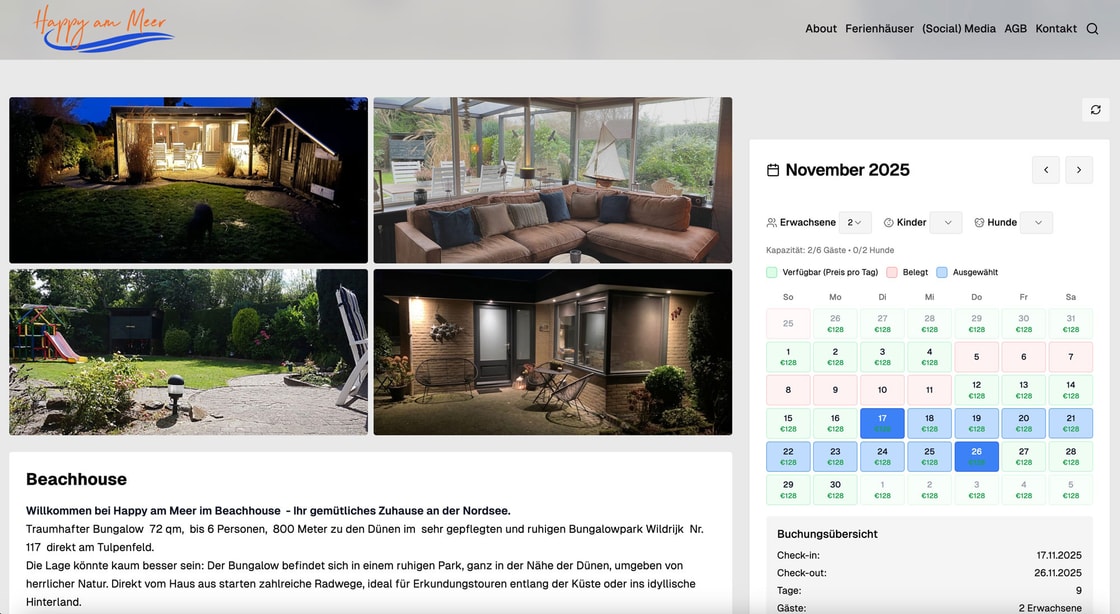
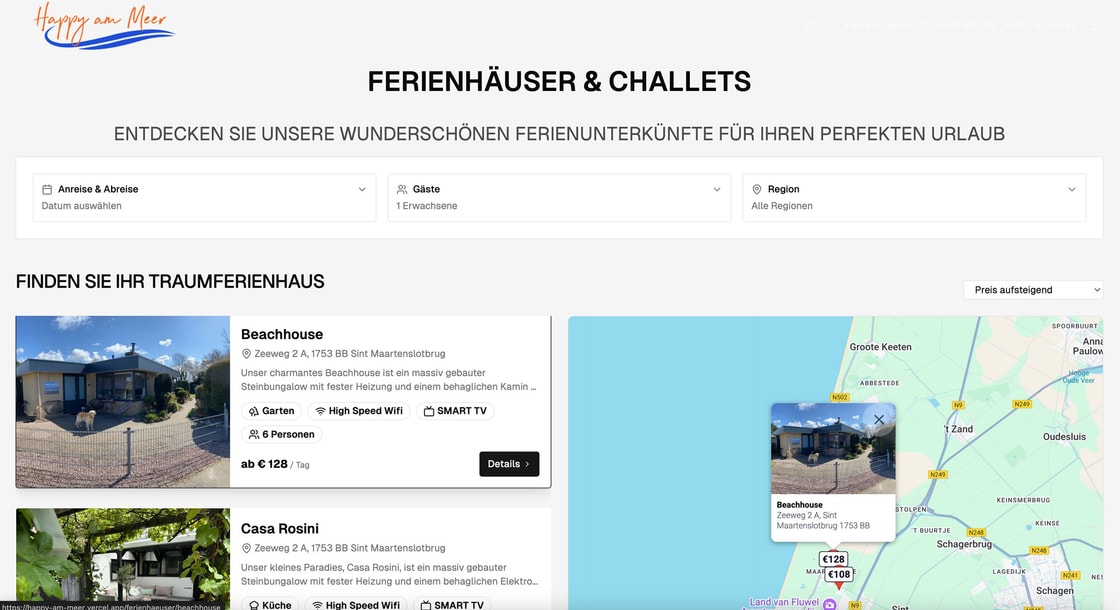
I designed and built the production platform for Happy am Meer, a vacation rental company serving the Dutch–German holiday market. The product combines a marketing website, a multi-property Ferienhaus catalog, and a booking flow that checks real availability, accepts inquiries, and stays aligned with external OTA calendars (Airbnb, Booking.com, VRBO).
Live site: https://happy-am-meer.nl · Stack: Next.js 15, Payload CMS 3.36, MongoDB, Vercel · CMS admin: Payload (see gallery)
I owned the architecture end to end: from Payload collections and API routes through the booking calendar UI, background iCal sync, and deployment on a custom domain. The goal was not a brochure site but a system the client can run day to day—publish properties, sync calendars, and receive booking inquiries without double-booking risk.
That meant solving stale availability data, complex German pricing rules (seasonal rates, Kurtaxe, optional fees), and a mobile booking experience that converts on small screens—while keeping Lighthouse performance in the low 90s and SEO at 100.
Outcomes at a Glance
- Lighthouse: Performance 92–95, Accessibility 95–98, Best Practices 100, SEO 100
- Availability checks: Sub-200ms response target on cached listing and property queries
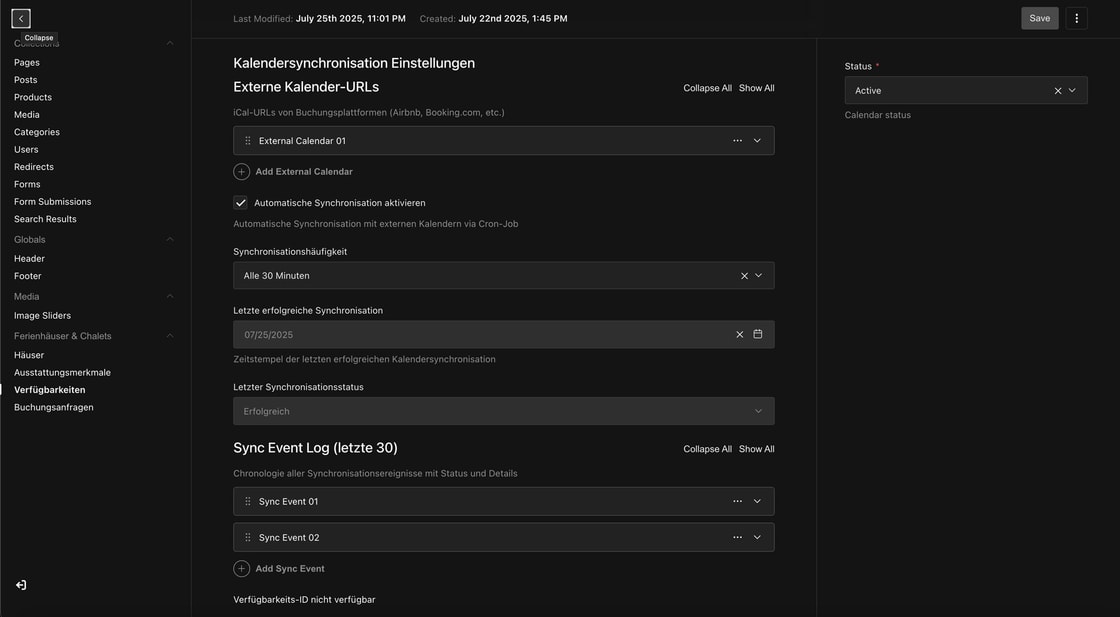
- Calendar sync: Vercel cron every 15 minutes; per-property sync intervals; parity validation after each sync
- Caching:
unstable_cachewith tag-based revalidation on property listings (10-minute TTL) - Quality: Jest unit tests on stay-range coverage and availability mapping utilities
- Compliance-oriented UX: Map embed consent, Matomo analytics, social video embed consent, AGB link in booking flow
My Role & Deliverables
As the sole developer on this project, I delivered:
- Architecture: Next.js 15 App Router + Payload CMS monolith on MongoDB; single codebase for marketing, admin, and APIs
- Booking UX: Refactored booking calendar, React Query data layer, mobile sticky bar and full-screen modal, minimum-stay rules, error boundaries
- API layer: Property listing with filters and sort; availability POST; booking inquiry with server-side overlap checks and HTTP 409 on conflicts
- Calendar sync: iCal ingestion, background batch jobs, calendar parity validation, cache revalidation after sync
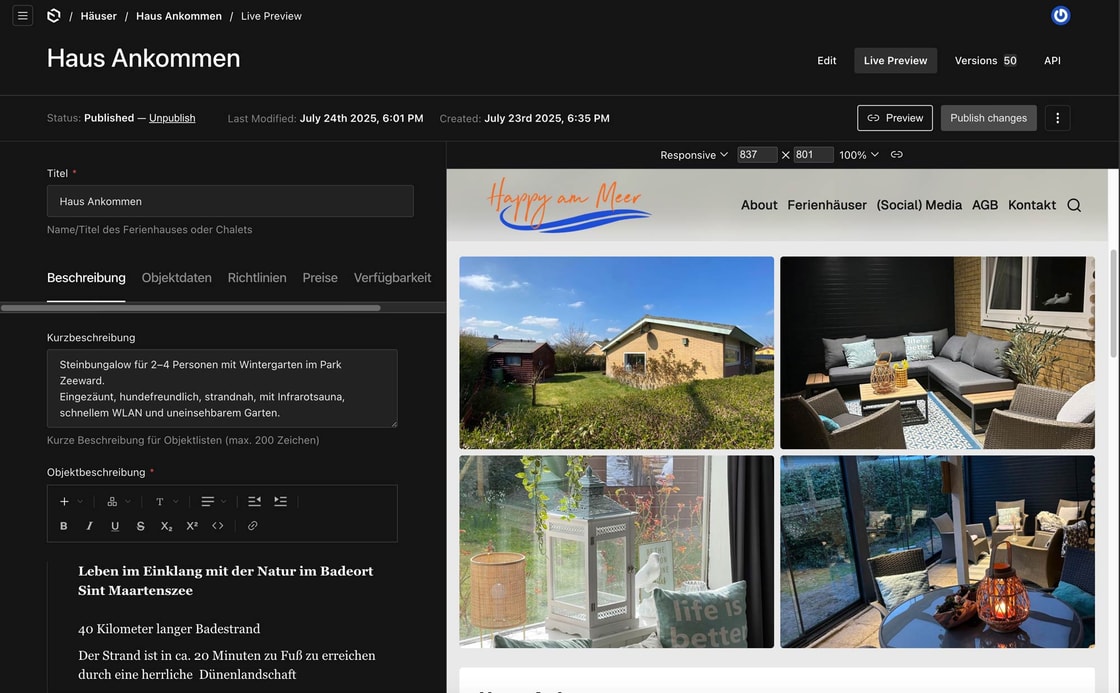
- CMS: Ferienhaus, availability, and inquiry collections; 13 content blocks; live preview on
happy-am-meer.nl - Ops: Vercel deployment, Linode S3 media, SMTP inquiry emails, custom domain and cron configuration
What I Solved
Listings & search
- Region, property type (Ferienhaus / Chalet), and sort options exposed via URL query params and UI controls
- Date-range filtering with stay-range coverage: only properties with enough bookable nights in the selected range appear in results
- Cached property catalog with tag revalidation so marketing pages stay fast under load
Booking & inquiries
- Multi-mode booking calendar (compact header, full availability view, single-property detail)
- Seasonal pricing with “highest price wins” logic, Kurtaxe, and optional fees; German Euro formatting across the UI
- Server-side availability checks before creating an inquiry; conflicts return 409 instead of silent bad data
- Automated inquiry emails via Nodemailer / SMTP
Calendar sync
- Per-property iCal feeds from OTAs merged into availability records in MongoDB
- Background sync every 15 minutes via Vercel cron, with per-property frequency settings respected
- Error isolation per calendar so one bad feed does not block the rest
- Parity validation after sync to reconcile external bookings with internal state
Content & CMS
- Block-based pages (13 Payload blocks) for flexible marketing content without developer involvement
- Ferienhaus admin: galleries, amenities, pricing, SEO, and calendar feed configuration
- Live preview on the production domain so editors see breakpoints before publish
Mobile & compliance
- Scroll-based sticky booking bar (400px threshold) and full-screen calendar modal on small screens
- Landscape layout handling on phones; touch-optimized calendar interactions
- Map embed consent before loading Google Maps; social embed consent for Instagram/TikTok in MediaBlock
- Matomo for privacy-oriented analytics; gender-neutral guest labels in German copy
Tech Stack
- Next.js 15.0.7 — App Router, server components,
unstable_cache, tag revalidation - React 19.2.3 — Client booking UI, Framer Motion form animations
- TypeScript 5.6.3 — Strict mode; auto-generated
payload-types.ts - Payload CMS 3.36.0 — Lexical rich text, live preview, S3 storage plugin, SEO plugin
- TanStack React Query 5.x — Client data layer for listings, pricing, and availability
- MongoDB Atlas — Properties, availability, inquiries, and CMS content
- S3 (Linode Object Storage) — Media via
@payloadcms/storage-s3 - TailwindCSS 3.4.3 + Shadcn UI / Radix primitives
- Vercel — Production host; cron
*/15 * * * *; 60s function timeout on sync routes - React Hook Form 7.45.4 — Inquiry and booking forms with validation
- Sharp 0.34.4 — Image pipeline
- Jest 30 + Testing Library — Unit tests for availability helpers
Implementation Highlights
These patterns show how I kept business logic on the server and data integrity first—typical of the work agencies hire senior full-stack freelancers for.
Booking inquiry with conflict handling
I resolve the published property, load its availability document, run overlap checks on the server, and only then create the inquiry. Unavailable dates return 409 so the client never stores a booking that conflicts with blocked or external calendar dates.
const property = await payload.find({
  collection: 'ferienhaeuser',
  where: {
    slug: { equals: slug },
    _status: { equals: 'published' },
    status: { equals: 'active' },
  },
  depth: 3,
  limit: 1,
});

const availability = await payload.find({
  collection: 'availability',
  where: {
    property: { equals: property.docs[0].id },
    status: { equals: 'active' },
  },
  depth: 0,
  limit: 1,
});

// Overlap check against blockedDates + externalBookings — return 409 if conflict

const inquiry = await payload.create({
  collection: 'booking-inquiries',
  data: {
    property: property.docs[0].id,
    guestDetails,
    stayDetails,
    inquiryDetails,
    status: 'new',
    priority: 'normal',
  },
});
Listing filters and date-range coverage
The listing API caches published properties, then applies in-memory filters for region, property type, sort order, and optional date range. I use computeStayRangeCoverage so a property only passes the filter if it has at least the minimum number of bookable nights in the guest’s range—matching how vacation rentals are actually searched.
// Query params: regions, propertyType, sort, checkIn, checkOut
const cachedDocs = await getCachedProperties();
const availabilityRecords = await getCachedAvailabilityRecords();

for (const property of cachedDocs) {
  if (checkIn && checkOut) {
    const record = availabilityRecords.find(/* match property id */);
    if (!propertyPassesDateFilter(record, checkIn, checkOut)) continue;
  }
  // apply region, propertyType, sort...
}
Production calendar sync (Vercel cron)
External calendars run on a schedule without blocking the admin UI. The cron route forwards to a background worker that batches eligible properties and revalidates Next.js cache tags after a successful sync.
{
  "crons": [
    {
      "path": "/api/cron/ical-sync",
      "schedule": "*/15 * * * *"
    }
  ]
}
// /api/cron/ical-sync forwards to /api/ical-sync/background
// Batches getPropertiesForSync() → syncMultipleProperties()
// On success: revalidateTag('availability'), revalidateTag('ferienhaeuser')
Architecture Summary
All vacation-rental data lives in MongoDB and is accessed through Payload’s Local API inside Next.js route handlers—no separate microservice layer. The main collections are Ferienhaus (listings), Availability (blocked dates, external bookings, sync settings), and BookingInquiries (guest requests).
Public pages under src/app/(frontend)/ (Ferienhaus listing and detail, availability calendar, marketing pages). APIs under src/app/api/ (ferienhaeuser-api, booking-inquiry, ical-sync, cron). Booking UI lives in src/components/booking-calendar/. Payload admin and collections config sit alongside the Next.js app in one deployable unit on Vercel.
CMS configuration highlights: live preview with mobile/tablet/desktop breakpoints on happy-am-meer.nl; S3-backed media collection; SEO plugin on pages and properties; 13 reusable content blocks for the marketing team.
Project Structure (abbreviated)
src/
├── app/
│   ├── (frontend)/ferienhaeuser/   # Listing + property detail + booking
│   ├── (frontend)/verfuegbarkeit/  # Multi-property calendar
│   ├── (payload)/                  # Admin panel
│   └── api/
│       ├── ferienhaeuser-api/      # Listings, availability, inquiries
│       ├── ical-sync/              # Manual + background sync
│       └── cron/ical-sync/          # Vercel cron entry
├── collections/                    # Ferienhaeuser, Availability, BookingInquiries, …
├── components/booking-calendar/    # Calendar, mobile bar, modal
├── blocks/                         # 13 Payload content blocks
└── utilities/                    # Pricing, coverage, caching helpers
Performance & Quality
I optimized for Core Web Vitals and maintainability, not just feature count:
- Caching: Multi-layer strategy—
unstable_cacheon listings and availability, React Query on the client, tag revalidation after sync and CMS publishes - Images: Sharp pipeline; long-cache headers on static assets via Vercel config
- Code splitting: Dynamic imports for heavy booking components
- Tests: Jest coverage on
computeStayRangeCoverageand availability mapping—domain logic that must stay correct as calendars change
Current Lighthouse scores (production):
- Performance: 92–95/100
- Accessibility: 95–98/100
- Best Practices: 100/100
- SEO: 100/100
Closing Note
This project is a strong example of solo full-stack delivery: I took a real business (multi-property holiday rentals with OTA calendars) from architecture through production, and I continue to extend it—React Query migration, listing filters, parity validation, and mobile booking refinements in 2025–2026.
If you are hiring for Next.js + headless CMS + booking or availability systems, this case study reflects the kind of end-to-end ownership I bring to agency and client projects.